
User guide: Restoration action dashboard
Restoration actions are site-specific restoration opportunities that would benefit fish and fish habitat in a strategic manner by addressing identified restoration goals. Restoration actions have been assessed to ensure they are:
- strategic restoration opportunities that address an identified restoration goal, and meet DFO’s Offsetting Policy
- consistent with provincial fish management objectives
- consistent with Indigenous priorities, where information is provided
- consistent with existing land-use practices (for example, agricultural drains)
- not barriers, where if removed would enable the expansion of invasive species or compromise protections of species at risk and/or isolated native populations
If there is interest in pursuing a specific restoration action, the following steps should be considered:
- consult with DFO to determine whether a specific restoration action is suitable for the intended DFO program or tool, such as:
- habitat banking
- offsetting
- funding through grants or contributions
- contact DFO and/or the source of the action identified in the dashboard for possible additional site-specific information
- securing property access
- exploring funding and resource opportunities
- conduct feasibility assessments, including but not limited to socio-economic assessments, determining compatibility with existing land-uses (for example, drain maintenance) and exploring future climate resilience
- plan and design implementation approach and materials
- Indigenous engagement for implementation approach and materials
- obtain applicable permits/authorizations from DFO and others
- design monitoring plan
- carry out restoration work while following appropriate avoidance, mitigation and permit conditions
- inform DFO when the status of a restoration action changes to “in progress” or “complete”
- monitor and report on success
About this dashboard
This dashboard provides an overview of site-specific restoration actions. There are more layers under ‘Important areas’ and ‘Context Data’ that can provide more information and context. The map does not offer a full view of Canada. It is focused on DFO’s Ontario and Prairie Region.
Tips for interacting with the dashboard:
- To reposition the map, zoom in and out using your mouse wheel or the zoom buttons, and drag the map. As you zoom, the map may display more or less features.
- To reposition and zoom the map to a location, type a place name or address in the Find address or place bar.
- To turn layers on and off or view more contextual layers, use the layers catalog.
- To filter restoration actions for ideal search results, use the dashboard filters.
Navigation
The Navigation icons are positioned vertically on the right side of the screen within the map.


Search

Legend
Layers

Basemap gallery
Dashboard filters
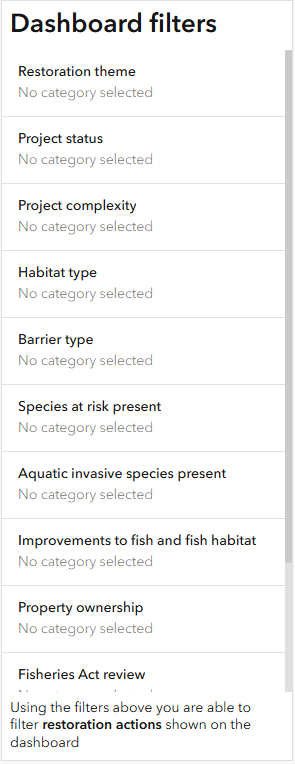
Description
A panel titled ‘Dashboard filters’ displays a list of filter categories, each labeled ‘No category selected.’ Categories include:
- Restoration theme
- Project status
- Project complexity
- Habitat type
- Barrier type
- Species at risk present
- Aquatic invasive species present
- Improvements to fish and fish habitat
- Property ownership
- Fisheries Act review
- Species at Risk Act review
- Aquatic Invasive Species review
A note at the bottom explains that these filters refine restoration actions shown on the dashboard.
Reset

- Date modified: